Does poker really need an oval table?
Mobile phones are amazing things, but their screens are still too damn small.
Our first attempt at a mobile app replaced the traditional table with rows. Each player got a row, the board and pot sat just above the betting controls, and the action buttons stayed at the bottom. It seemed like a reasonable idea at the time. Everyone we showed it to told us it sucked and was confusing. The feedback was consistent, which was about the only encouraging part.
We eventually removed it. Here's what we were trying to solve, why we think the rows failed, and what we learned building the phone table that replaced them.
On a computer, you have space for players around a felt, their cards, stacks and bets, the board, the pot, and the controls. On a phone, all of that needs to fit into a narrow screen, with room for a finger to hit the right button.
And that's an ordinary Hold'em hand. Omaha adds cards. Stud exposes cards around the table. SOHE gives each player six cards split into two hands. Some games have two boards. A tournament adds clocks and bounties. Winning a pot can involve several players winning different pieces of it.
You can shrink a desktop table until everything technically fits. Eventually, though, the player needs better eyesight and a smaller finger.
Our row-based layout put each player's name, stack, cards, bet and action into columns. The other players were listed above your own row. The board and pot sat in a strip between your row and the betting controls.
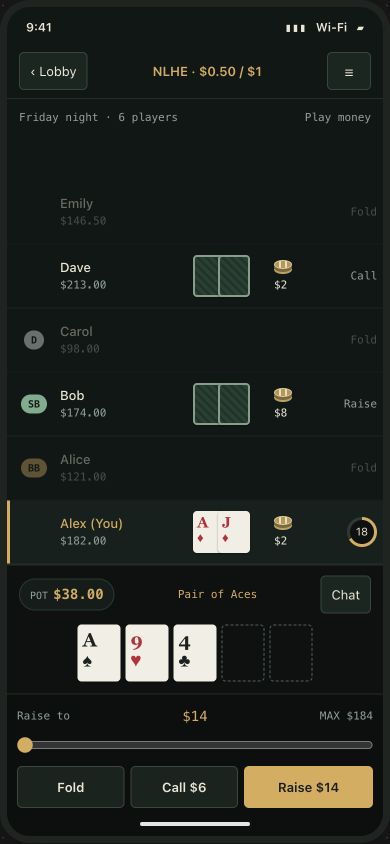
There were sensible reasons for trying it. Phones are good at lists. Rows give information a predictable place, and a long table can scroll. We could give card ranks space without finding room for a whole oval table.
It also looked like a way to stop spending quite so much time moving little rectangles around a screen.
The problem was that people had come to play poker. We had given them something that required learning how to read poker again. We were using the space on the screen better, but following the action was totally unintuitive.
Around a familiar table, position carries information. You can see the button, who's beside it, whose bet is in front of them, and where the action is moving. You still need labels and indicators, but they sit inside a shape players already understand.
Our rows kept the information. They changed how people had to connect it. You could read someone's stack without necessarily having the same immediate sense of where they sat in the hand. Once scrolling entered the picture, the whole table wasn't necessarily visible together either.
Looking back, we think we'd saved space at the expense of that familiar picture. A list works well for reviewing past hands. Following a hand while it's happening asks something different of the player.
That's our explanation for why it failed, rather than a claim that we ran a formal usability study. The feedback itself was much less elaborate: people didn't like it and found it confusing.
So we built a portrait felt with players around the board. It shares game behavior with the desktop version, but has its own seat shapes and positions. Wide desktop nameplates don't suddenly become useful on a narrow rail just because you make them smaller.
That brought us back to moving rectangles, with a better reason for doing it. We needed to fit the seats, cards and bets while preserving the relationships that made the game readable.
One layout wasn't enough for every phone height. Stretching the same seat positions across short and tall screens could bring players' cards too close to the board. We added layouts for three groups of available table heights. We measure the space the table actually has, rather than guess the phone model.
We also keep that group steady during a hand. A browser toolbar changing height shouldn't suddenly rearrange everyone's seats while they're playing. The layout can choose a different group between hands.
The advertised screen size isn't the space available to the poker table. Browser controls take room. Opening the same app from the home screen can leave a different amount. The notch and home indicator need clearance. Open the keyboard to chat and another large piece disappears.
WebKit's explanation of safe areas shows why filling the screen also means padding important content away from its obstructed edges. In poker, that can be the difference between a button you can see and one you can comfortably use.
We found less obvious ways to waste space too. At one point, the phone's top bar held up to nine unlabeled icons. Moving the secondary actions into a labeled menu made room and made those actions easier to identify. The menu floats over the table; opening it doesn't take another slice out of the felt and move everything underneath.
There's a tradeoff there. A menu takes another tap, and while it's open it covers part of the game. Not every feature can occupy the front row all night.
The cards once fit in our card-selection tray, but the buttons ended up partly below the screen. We made the tray more compact, reduced padding and put the countdown beside the caption. We checked the text in English, Spanish and French, because labels don't all take the same space.
Showdown needed another pass. Six SOHE cards could collide with a chat button or tournament clock. They also needed to show which two belonged to Hold'em and which four belonged to Omaha. Merely showing six cards wasn't enough.
Touch controls add another constraint. A small icon can be readable while the area you need to tap is too small or too close to another control. The W3C's guidance on target size and spacing explains that distinction. It's particularly unwelcome when the neighboring button commits chips.
We still have limits. Very small screens remain difficult, and our phone layout warns when the screen is below its supported size. A browser preview also can't establish that everything feels right on an actual device.
Even after we'd built the portrait table, we kept the row layout around for a while. Then we hid it from settings. Eventually we deleted it, including its preview.
Keeping it wasn't free. Each table feature had to be checked in the desktop, portrait, and row layouts, and the rows had fallen behind on things such as run-it-twice prompts and tournament notices. Maintaining a layout nobody could choose wasn't helping anyone play poker.
The useful lesson wasn't that familiar designs can never change. It was that we needed to understand what the familiar table was doing before replacing it. We thought we were removing wasted space. Some of that space was helping people understand the game.
Additional reading on skeuomorphic design
Skeuomorphic design borrows from familiar physical objects to help people understand a digital interface. These readings explore where that helps and where it can get in the way.
- Skeuomorphism, by Megan Chan, explains the difference between using familiar objects to make an interface understandable and copying their appearance for decoration.
- Flat Design: Its Origins, Its Problems, and Why Flat 2.0 Is Better for Users, by Kate Moran, looks at what can be lost when an interface removes visual clues in pursuit of simplicity.
- The Design of Everyday Things, by Don Norman, is a book about making everyday objects understandable through clear controls, useful feedback, and the way people expect things to work.